Game UI Design: How Radial Menus Enhance Player Experience
Player expectations for game interfaces have evolved significantly over the years. Modern games feature expansive inventories, multiple abilities, contextual interactions, companion commands, crafting systems, and communication tools all of which need to be easily accessible without disrupting gameplay.
While these features add depth, they also introduce a UX challenge: how do you give players quick access to dozens of actions without overwhelming them with complex menus or countless key bindings?
This is where radial menus stand out. Their circular layout allows players to select actions quickly through directional input, making interactions feel more intuitive and responsive.
Rather than searching through lists or remembering numerous shortcuts, players can perform common actions with minimal effort, helping them stay focused on the game instead of the interface.
In this article, we’ll explore how radial menus improve gameplay UX, the gameplay scenarios where they deliver the greatest value, common design mistakes to avoid, and best practices for creating intuitive radial menus.
- What Is a Radial Menu?
- The UX Challenges Traditional Game Menus Create
- The Impact of Radial Menus on Gameplay UX
- Where Radial Menus Deliver the Greatest UX Benefits
- Best Practices for Designing an Effective Radial Menu
- When Should You Use a Radial Menu?
- Common Radial Menu Mistakes That Hurt UX
- How 300Mind Builds Intuitive Gameplay Experiences
- FAQs
What Is a Radial Menu?
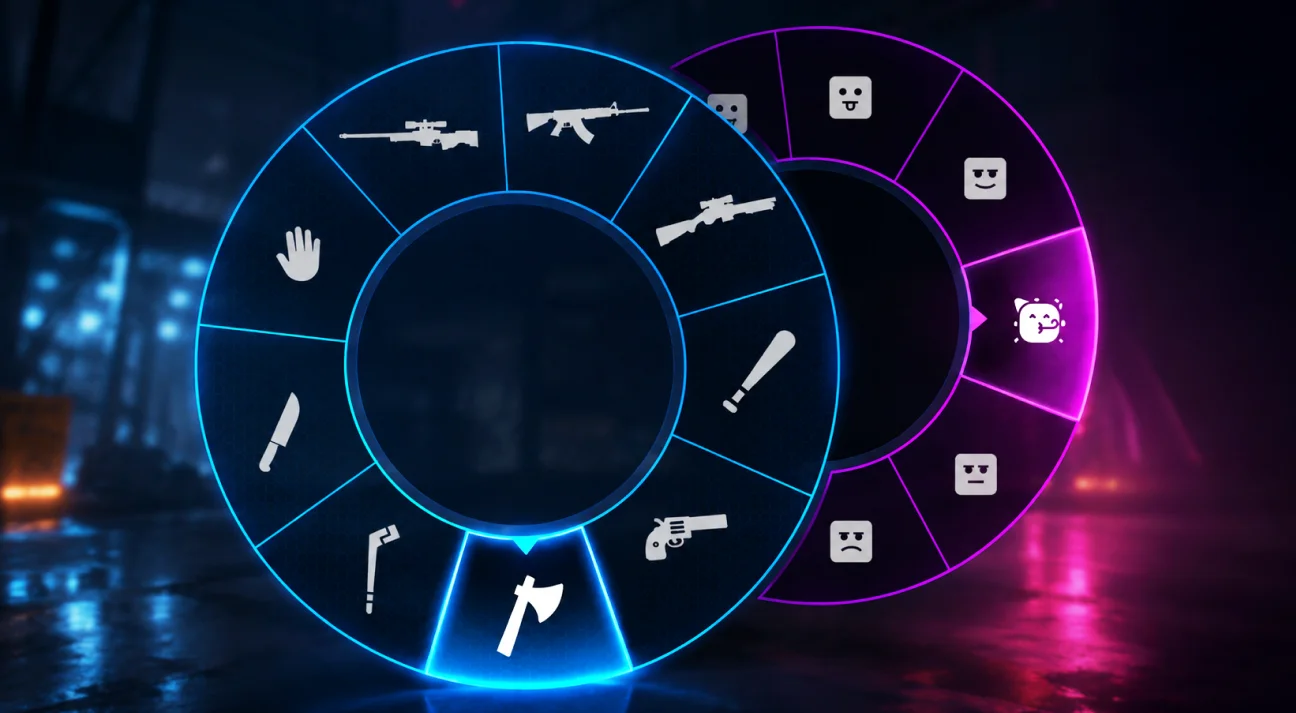
A radial menu is a circular user interface that displays actions, commands, or items around a central point. Instead of navigating through vertical lists or nested menus, players choose an option by moving a cursor, mouse, or joystick toward the desired segment.
Unlike traditional menus where options are arranged in rows or columns, every item in a radial menu sits at an equal distance from the center. This layout reduces cursor movement and makes selections faster, particularly during gameplay where every second counts.
Radial menus are widely used for:
- Weapon selection
- Ability and spell wheels
- Inventory shortcuts
- Crafting and building tools
- Dialogue choices
- Vehicle controls
- Companion commands
- Emotes and multiplayer communication
One of the reasons radial menus have become so popular is their versatility. The same interface pattern can support a variety of gameplay systems while maintaining a consistent user experience across different genres.
The UX Challenges Traditional Game Menus Create
As games become more feature-rich, traditional UI patterns often struggle to keep up. Menus that work well for simple games can become cumbersome when players need to manage dozens of actions in real time.
Let’s look at some of the most common challenges.
Input Overload
Modern games often assign different actions to individual keys or controller buttons. Players may need shortcuts for weapons, abilities, consumables, communication, crafting, and interactions, all within the same session.
The more inputs players need to memorize, the greater the mental effort required to perform routine actions. This becomes especially challenging for new players who are still learning the game’s mechanics.
A well-designed interface should reduce this learning curve rather than add to it.
Gameplay Flow Interruptions
Pausing to open multiple menu layers can break the pace of gameplay.
For example, imagine a player in the middle of combat who needs to:
- Open the inventory
- Scroll through available weapons
- Select the appropriate item
- Close the menu
- Return to the fight
Although each step may take only a few seconds, together they interrupt the player’s flow and reduce responsiveness during critical moments.
This interruption is particularly noticeable in action-heavy genres where quick reactions are essential.
Screen Clutter and Visual Distractions
Game interfaces already display important information such as:
- Health and stamina
- Mini maps
- Objectives
- Ammunition
- Quest updates
- Notifications
Adding permanent toolbars or extensive HUD elements for every possible action can overwhelm players and distract them from the game world.
Good gameplay UX prioritizes showing information only when it’s needed.
Limited Controller Accessibility
While scrolling through menus with a mouse can be relatively quick, the experience is often slower on controllers.
Players typically need to:
- Navigate vertically or horizontally
- Move through multiple menu levels
- Confirm selections repeatedly
This process can feel cumbersome compared to simply moving an analog stick in a specific direction.
As console gaming has grown, developers have increasingly adopted interface patterns that better align with controller input, making directional navigation an important consideration in modern UI design.
The Impact of Radial Menus on Gameplay UX
The effectiveness of radial menus isn’t just about aesthetics. Their design is rooted in UX principles that help players interact with games more naturally, efficiently, and confidently.
Here’s how they enhance the overall gameplay experience.
Reduced Cognitive Load
One of the primary goals of good UX design is to minimize the amount of mental effort required to complete a task.
Traditional menus often require players to:
- Read through multiple options
- Compare similar choices
- Remember shortcut keys
- Navigate several interface layers
Each of these actions adds cognitive load, forcing players to divide their attention between the interface and the game itself.
Radial menus simplify this process by presenting all available actions in a single, organized view. Because options are grouped around a central point, players can quickly recognize what they need instead of searching through lengthy lists.
The result is a smoother interaction that allows players to focus more on gameplay and less on menu navigation.
Muscle Memory Through Directional Input
One of the biggest strengths of radial menus is that they encourage directional learning.
Instead of remembering a keyboard shortcut or scanning a list every time, players begin associating actions with specific directions.
For example:
- Up → Primary weapon
- Right → Grenade
- Down → Healing item
- Left → Flashlight
After repeated use, players often stop thinking about the menu altogether. Their hands naturally move toward the correct direction, allowing them to perform actions almost instinctively.
This muscle memory develops over time and significantly improves interaction speed, especially during fast-paced gameplay where split-second decisions matter.
Faster Decision-Making
Every interaction in a game involves a small decision. The faster players can make that decision, the smoother the gameplay feels.
Traditional menus may require scrolling through several entries before reaching the desired option. Radial menus, on the other hand, display every available choice at once, reducing the number of steps needed to complete an action.
Another advantage is that each option is positioned at an equal distance from the center. Players don’t need to move a cursor across long lists or multiple interface levels, they simply move in the direction of the desired action.
This consistent layout helps reduce selection time and makes the interface feel more responsive, particularly in combat, exploration, and other time-sensitive situations.
Improved Gameplay Focus
One of the hallmarks of a good game UI is that it stays out of the player’s way. Instead of demanding constant attention, it should provide information and controls only when they’re needed.
Radial menus support this principle by appearing as temporary overlays. Players can quickly open the menu, make a selection, and return to gameplay within moments.
Unlike full-screen inventory windows or multi-level menus, radial menus minimize interruptions and help maintain the pace of the game.
This is particularly valuable in fast-paced genres like action, shooters, and survival games, where pausing to navigate complex interfaces can negatively impact the player experience.
Cross-Platform Accessibility or Multi-Input Accessibility
Today’s games are played across PCs, consoles, and handheld devices, making it essential for interfaces to support multiple input methods.
Radial menus are naturally suited to analog sticks, as players can select options by simply tilting the stick toward the desired segment. On PC, the same interaction translates well to mouse movement, while keyboard users can navigate using directional inputs or shortcuts.
Because the interaction remains consistent across devices, players enjoy a familiar experience regardless of their preferred platform.
Better Organization of Gameplay Systems
As games grow in scope, the number of available player actions also increases.
A survival game might include:
- Weapons
- Tools
- Building pieces
- Crafting recipes
- Consumables
- Companion commands
Displaying all of these options permanently would clutter the screen and make navigation more difficult.
Radial menus solve this by grouping related actions into organized categories that appear only when needed. This keeps the HUD cleaner while still providing quick access to essential gameplay features.
Where Radial Menus Deliver the Greatest UX Benefits
Although radial menus can be adapted to many interaction systems, they are particularly effective in scenarios where players need to make quick decisions without breaking the flow of gameplay.
Weapon Selection
Weapon wheels are perhaps the most recognizable use of radial menus, especially in action and shooter games where players need to react quickly to changing combat situations.
Instead of cycling through weapons one by one, players can instantly choose the exact weapon they need. This reduces unnecessary input and helps maintain momentum during combat.
If you’re exploring combat mechanics in Unreal Engine, check out our guide on building AI turrets in Unreal Engine 5.
Ability and Skill Menus
Role-playing and action games often feature numerous abilities with different cooldowns and tactical uses.
Grouping these abilities into a radial menu allows players to quickly access skills without relying on dozens of dedicated hotkeys, making combat feel more fluid and intuitive.
Inventory and Crafting Shortcuts
Survival and sandbox games frequently require players to switch between tools, materials, and crafting options.
Rather than opening several interface windows, radial menus provide immediate access to commonly used items, allowing players to continue exploring or building with minimal interruption.
Contextual Interaction Menus
Many games present different interaction options depending on the object or character the player is facing.
For example, interacting with a vehicle might display options to:
- Enter
- Repair
- Refuel
- Inspect
Using a radial menu keeps these actions organized while avoiding unnecessary on-screen buttons.
Emotes and Multiplayer Communication
Communication wheels have become a standard feature in many multiplayer games.
Players can quickly send pings, issue tactical commands, or use emotes without opening chat windows or navigating complex interfaces. This improves team coordination while keeping gameplay uninterrupted.
Best Practices for Designing an Effective Radial Menu
Simply arranging options in a circle doesn’t guarantee a great user experience. Thoughtful design decisions play a significant role in how intuitive and responsive a radial menu feels.
Keep the Number of Options Manageable
As more options are added, each menu segment becomes smaller and harder to select accurately.
For most gameplay scenarios, limiting the menu to 6–10 options provides a good balance between functionality and usability.
If additional actions are required, consider using nested menus or context-sensitive radial menus rather than overcrowding a single interface.
Use Clear Icons and Maintain Consistent Placement
Players should be able to recognize actions at a glance.
Using distinctive icons alongside concise labels improves readability, particularly for new players. At the same time, frequently used actions should remain in fixed positions. Consistent placement helps players develop muscle memory, allowing them to make selections faster over time.
Provide Immediate Feedback
Every interaction should reassure players that their input has been recognized.
Visual cues such as highlighted menu segments, animations, scaling effects, or subtle color changes make the interface feel more responsive. Combined with outline effects for selected or interactable objects, they create a more intuitive gameplay experience by giving players immediate visual confirmation before they perform an action.
Design for Multiple Input Methods
An effective radial menu should feel equally intuitive whether players use a mouse, keyboard, gamepad, or touchscreen.
Testing across different input devices helps ensure that menu spacing, selection accuracy, and responsiveness remain consistent on every platform.
When Should You Use a Radial Menu?
While radial menus are highly effective for many gameplay systems, they aren’t the ideal solution for every interface.
They’re best suited for situations where players need quick access to a limited number of frequently used actions, including:
- Weapon selection
- Ability and spell wheels
- Interaction menus
- Inventory shortcuts
- Building tools
- Vehicle controls
- Companion commands
- Communication wheels
However, if players need to browse dozens of items, compare detailed statistics, or manage large inventories, traditional grids, categorized menus, or searchable interfaces often provide a better experience.
Choosing the right UI pattern ultimately depends on the complexity of the gameplay system and how players interact with it.
Common Radial Menu Mistakes That Hurt UX
Even well-designed radial menus can frustrate players if key UX principles are overlooked. Avoiding these common mistakes can make interactions feel smoother and more reliable.
1. Missing or Poorly Configured Dead Zones
This is almost always caused by a missing or too-small dead zone at the center of the wheel. Without one, tiny cursor or analog stick movements near the origin point register as directional input, causing the menu to flicker between segments before the player has intentionally made a selection.
2. Overcrowded Menu Segments
Packing too many options into a single radial menu, or giving every segment equal space regardless of usage, increases the likelihood of mis-selections under pressure. Prioritizing frequently used actions and, where appropriate, allocating them more angular space helps improve accuracy and usability.
3. Disorienting Nested Menu Transitions
If a parent radial menu disappears abruptly when a nested menu opens, players can lose their sense of the menu hierarchy. Smooth transition animations or keeping the parent menu visible in a dimmed state provides better context without slowing down interactions.
4. Slow Selection and Confirmation Flow
Even with fast animations, a radial menu can feel sluggish if players must first hover over an option and then press a separate confirmation button. For many gameplay scenarios, particularly on controllers, release-to-select interactions create a faster and more fluid experience by completing the selection in a single motion.
How 300Mind Builds Intuitive Gameplay Experiences
Radial menus have become one of the most effective UI patterns for modern games because they make complex interactions feel simple. By reducing cognitive load, encouraging muscle memory, minimizing screen clutter, and supporting multiple input methods, they help players stay immersed in gameplay rather than struggling with the interface.
At 300Mind, we believe great gameplay UX is built through thoughtful design, intuitive interactions, and seamless technical execution. Whether you’re creating a fast-paced shooter, an RPG with layered ability systems, or an open-world adventure, our game UI/UX design services help studios create intuitive interfaces that enhance gameplay without compromising immersion.
From custom gameplay interfaces and Unreal Engine development to production-ready tools like our Advanced Radial Menu for Unreal Engine, we help studios accelerate development while delivering polished player experiences. Our expertise spans game UI/UX design, gameplay programming, and custom Unreal Engine solutions, enabling developers to build responsive, scalable systems tailored to their game’s mechanics and creative vision.
Whether you need a ready-to-integrate solution or a fully custom gameplay interface, 300Mind can help you create intuitive experiences that keep players engaged from the first interaction to the final level.
This version keeps the focus on gameplay UX, positions 300Mind as the expert behind those experiences, and introduces both your services and the FAB asset in a way that feels like a natural extension of the article rather than a separate sales section.
FAQs
Here are answers to some of the most common questions game designers ask when evaluating radial menus for gameplay UX and implementation.
A radial menu is a circular interface where selectable actions or items are arranged around a central point. Players choose an option by moving in its direction rather than scrolling through a list, which makes selection faster and more intuitive.
Not universally better, just better suited to different situations. Radial menus outperform lists when speed and flow matter most, like mid-combat weapon or ability selection. Traditional lists still work better for long inventories, detailed comparisons, or menus without time pressure.
Most gameplay-focused radial menus work best with 6 to 10 options in a single ring. Beyond that, segments become too thin to select accurately, especially on a gamepad, so a nested or multi-level menu is usually the better approach.
They work well with both. Gamepads map naturally to angle and magnitude through the analog stick, while on mouse and keyboard, cursor position relative to the menu’s center serves the same purpose, so the interaction stays consistent across input devices.
Yes. Selecting a segment can open a secondary wheel for related sub-options, which lets a radial menu scale to dozens of total entries while keeping each individual decision small and easy to make.
Not necessarily. Many games design radial menus to slow time slightly or run in real time rather than fully pausing, which keeps players engaged with the game world while they make a selection.
Fast-paced genres see the biggest UX gains, shooters, action-adventure games, survival games, and RPGs with real-time combat, since these are the genres where interrupting the player to navigate a menu has the most noticeable cost.
Yes. If your project doesn’t require a completely custom implementation, a pre-built radial menu system can significantly reduce development time while still offering flexibility. Many solutions support features such as customizable layouts, nested menus, controller and mouse input, and dynamic option management out of the box.